 이중자막
이중자막
유튜브에서 영어 자막과 한국어 자막을 같이 보기
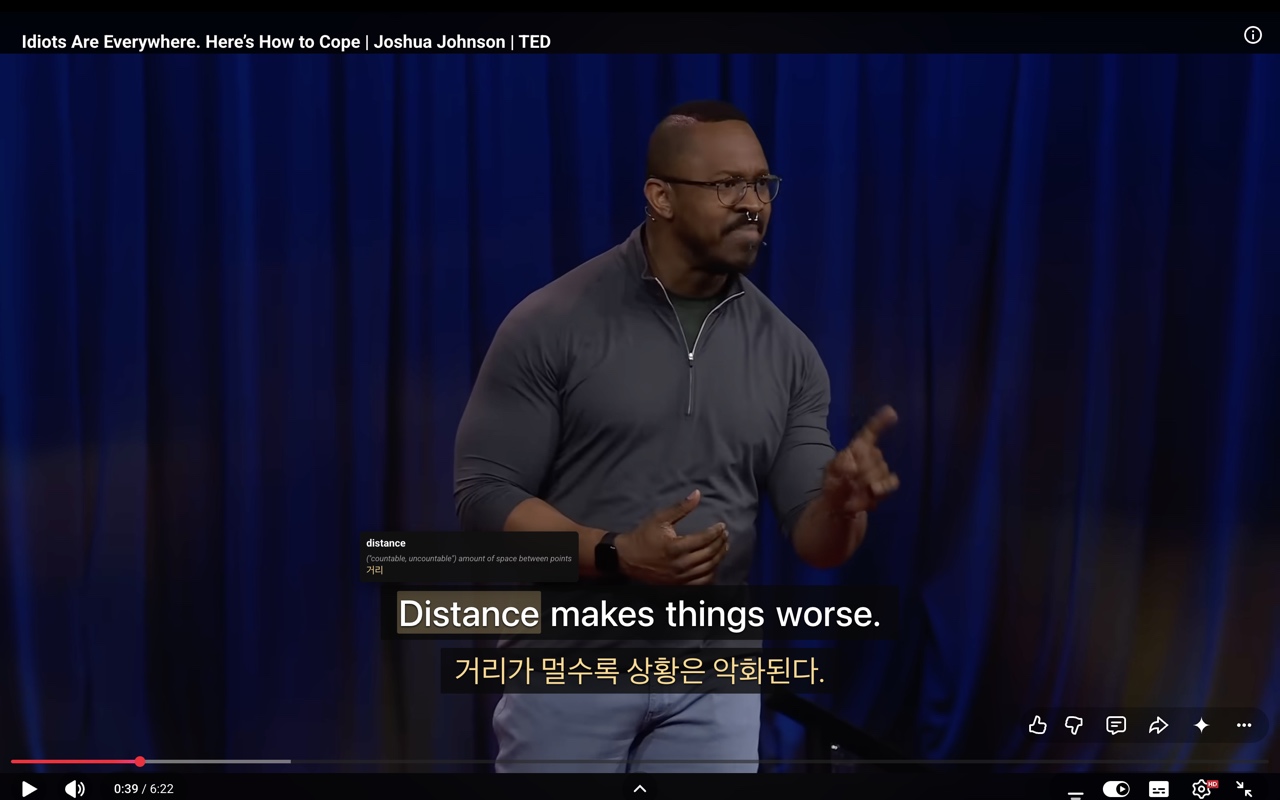
영어 자막을 켜면 모르는 단어에서 막히고, 한국어로 바꾸면 영어가 사라집니다. 둘을 동시에 띄우고, 모르는 단어를 누르면 한국어 뜻이 바로 나옵니다.
크롬에 추가하기무료 · 가입 없음 · 서버 없음
유튜브 기본 기능으로는 안 됩니다
톱니바퀴 → 자막 → 자동 번역 을 고르면 원하는 언어로 바꿀 수 있습니다. 영어 영상을 한국어로 보는 것도 됩니다.
하지만 한 번에 하나만 나옵니다. 영어를 보면 한국어가 없고, 한국어를 보면 영어가 없습니다. 껐다 켰다 하다 보면 영상 흐름이 끊깁니다. 유튜브가 이 기능을 넣을 낌새도 없습니다.
무엇이 되는가
자막 두 줄
영어와 한국어가 한 화면에 같이 나옵니다. 번갈아 볼 필요가 없습니다.
단어를 누르면 뜻
영상이 멈추고 한국어 뜻이 뜹니다. 사전을 따로 열지 않습니다.
뜻을 갈래로 나눠서
go 는 "가다"이기도 하고 바둑이기도 합니다. 어느 쪽인지 구분해 보여줍니다.
단어장
찾아본 단어가 쌓입니다. 확장 아이콘을 누르면 한눈에 봅니다.
가입도 서버도 없습니다. 저장되는 건 전부 여러분 브라우저 안에만 있고, 개발자가 볼 수 있는 것은 없습니다.
쓰는 법
- 설치합니다. 위의 “크롬에 추가하기”를 누르면 됩니다
- 유튜브 영상을 엽니다. 자막 두 줄이 저절로 나옵니다
- 모르는 단어를 누릅니다. 영상이 멈추고 뜻이 뜹니다
- 아이콘을 고정해두세요. 크롬 주소창 옆 퍼즐 조각(🧩)에서 이 확장을 고정하면, 아이콘 하나로 자막 크기·위치를 바꾸고 단어장을 볼 수 있습니다
안 되는 경우
- 자막이 아예 없는 영상 — 원본 자막이 없으면 어떤 확장도 만들어내지 못합니다
- 한국어 영상 — 원어가 한국어면 나서지 않습니다. 같은 줄을 두 번 보여줄 이유가 없으니까요
- 자막이 안 뜰 때 — 페이지를 새로고침하면 되는 경우가 많습니다
다른 확장과 무엇이 다른가
이 자리에는 이미 좋은 물건들이 있습니다. 정직하게 적겠습니다.
누가 만들었나
중학교 1학년이 바이브 코딩으로 만들었습니다. 자기가 유튜브로 영어를 공부하다 답답해서 만든 물건입니다.
아직 안 되는 게 있을 겁니다. 써보시고 이상한 게 있으면 novalaps.kr@gmail.com 으로 알려주세요. 고치겠습니다.
See English and Korean subtitles together on YouTube
Turn on English subtitles and you get stuck on words you don't know. Switch to Korean and the English is gone. This shows both at once — and clicking a word gives you its Korean meaning.
Add to ChromeFree · No sign-up · No server
YouTube can't do this on its own
Gear icon → Subtitles → Auto-translate lets you switch to any language, Korean included.
But only one at a time. English means no Korean; Korean means no English. Flipping between them breaks your flow, and there is no sign YouTube plans to add a both-at-once option.
What it does
Two subtitle lines
English and Korean on screen together. No switching back and forth.
Click a word
The video pauses and the Korean meaning appears. No dictionary to open.
Senses kept apart
go is a verb, and also a board game. Each sense is shown separately.
Vocabulary list
Words you look up are saved. Click the extension icon to see them all.
No account, no server. Everything it saves stays in your own browser, and the developer cannot see any of it.
How to use it
- Install it with the “Add to Chrome” button above
- Open any YouTube video. Two subtitle lines appear on their own
- Click a word you don't know. The video pauses and the meaning appears
- Pin the icon. From the puzzle-piece icon (🧩) next to Chrome's address bar, pin this extension — then one click opens subtitle size, position, and your vocabulary list
When it won't work
- Videos with no captions — no extension can invent subtitles that don't exist
- Korean-language videos — if the original is already Korean it stays out of the way, rather than printing the same line twice
- Subtitles not showing — reloading the page usually fixes it
How it differs from other extensions
There are already good tools here. Honestly:
Who made it
A first-year middle school student, using vibe coding. It exists because he got frustrated studying English on YouTube.
Some things probably don't work yet. Try it and tell me what's broken at novalaps.kr@gmail.com — I'll fix it.